
Rain Instant Pay
Rain Technologies IncBusiness
4.74.22K Reviews
- Version
- 2.10.1
- Installs
- 500.00K
- Age Rating
- Everyone
Screenshots
Our Review of Rain Instant Pay
 Analysis by Appyee
When an unexpected bill lands before payday, the problem is often not a lack of income but the gap between earning money and receiving it. Rain Instant Pay is built around that gap. I reviewed it as a business app from Rain Technologies Inc, and its purpose is straightforward: it connects eligible employer benefits with access to earned pay through a mobile experience. That sounds simple, but the usefulness depends heavily on your employer, your payroll setup, and how well the app fits the way you already manage money.
Rain Instant Pay is free to install, aimed at Everyone, and has reached more than half a million installs. Its average score sits at 4.7 from roughly 34 thousand ratings, with about 4.2 thousand written reviews. Those numbers suggest that many people find the core idea valuable, although popularity should not be confused with universal eligibility. This is not a general-purpose banking replacement that anyone can use independently. It is an employer-linked tool, so the first question is whether your workplace supports the service.
Following the money from a tight moment to a practical outcome
I’ll focus on the practical turn that matters most: how a short-term cash squeeze can become a manageable decision rather than an impulsive request. In the next section, I’ll look at the small checks I would make before acting, because a clear purpose and a realistic view of the next paycheck are what make early access useful.
The starting condition: needing access before the normal payday
The most realistic reason to open Rain is a short-term cash-flow problem. Imagine that I have already worked several shifts, but my regular payday is still ahead. A utility payment, a prescription, or a necessary trip suddenly needs attention. A credit card may solve the immediate problem, but it can turn a small timing issue into long-term debt. Asking a friend or taking out a high-cost loan can be even less attractive. In that situation, an employer-connected instant-pay service can offer a more direct route, provided the money I am trying to access is actually available through my workplace arrangement.
That distinction matters. Rain is not promising to create extra income, and it should not be treated as free money. The sensible way to think about it is as a bridge between completed work and the usual payroll date. I would use it for a defined need, not as permission to spend more than I earn. The app is most useful when the timing of a payment is the problem and I already have a plan for the next regular paycheck.
The first practical step is checking workplace eligibility. Because the service is based on employer benefits, a person who downloads it without a participating employer may not get the same experience as an eligible worker. I would have my employer information and personal details ready, then follow the in-app setup rather than assuming that any job can be connected. This employer dependency is the biggest difference between Rain and a normal budgeting or banking app.
Step one: setting up the connection
Once the app is installed, the important task is not browsing but establishing the right connection. The account needs to recognize the employer relationship so that the app can determine whether instant pay is available. This is where accuracy matters: using the same personal information associated with payroll should reduce avoidable confusion, while guessing at an employer name or entering inconsistent details can slow the process.
I also recommend treating the setup screen as a financial checkpoint rather than clicking through it automatically. Read each prompt, confirm that the employer is correct, and pay attention to how the app describes the available benefit. A fast-pay product is only helpful when I understand what it is offering and when the money should be expected. If the setup feels unclear, the right response is to pause and contact the employer or Rain support rather than repeatedly submitting different information.
The current version is 2.10.1, which indicates that the app has continued to receive product updates since its release on February 1, 2020. That history is reassuring from a maintenance perspective, but it does not remove the need to keep the app updated. Financial tools can be especially sensitive to changes in sign-in, verification, and payroll connections, so using an old build is an unnecessary source of friction.
Step two: checking what is available before making a request
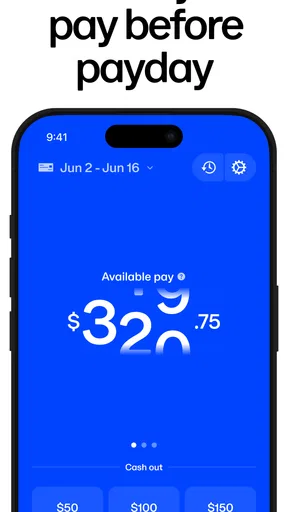
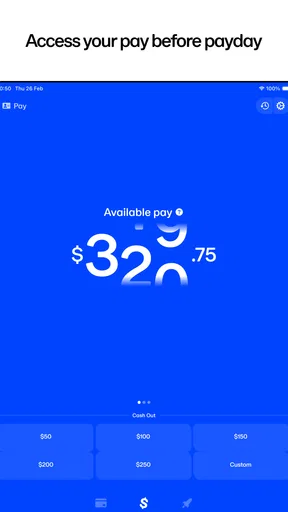
After the employer connection is in place, I would check the available balance before deciding what to do. This is one of the most important habits with Rain: look at the amount as a planning reference, not as a spending target. If I need only enough to cover a specific expense, requesting that amount is more disciplined than taking the largest amount shown simply because it is available.
A useful everyday workflow is to open the app when the problem appears, identify the exact shortfall, and compare that shortfall with the amount Rain makes accessible. For example, if a transportation expense is due before payday, I would request only what solves that immediate issue and record the expected effect on my next paycheck. This keeps the app in its proper role as a timing tool rather than allowing it to become a recurring substitute for a monthly budget.
There is also a handoff here between the app and my own records. Rain can show the relevant benefit information, but I still need to track upcoming bills, ordinary account balances, and the regular pay cycle elsewhere if necessary. A person who relies on the app alone may know what can be accessed without knowing what will remain available later. I find that a quick note in a budgeting app, spreadsheet, or even a paper calendar makes the decision safer.
Step three: moving from an in-app decision to real-world payment
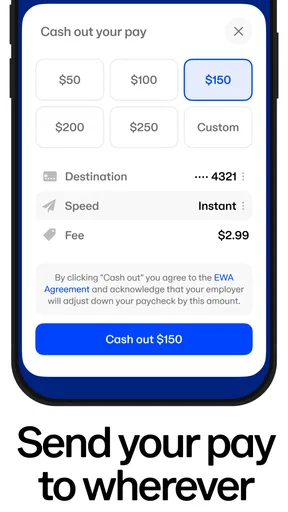
The next stage is where expectations should stay realistic. The app may make the request feel immediate, but the final usefulness depends on the handoff between Rain, the employer’s payroll information, and the destination for the funds. I would not schedule a bill at the exact edge of the expected arrival time. A small buffer is sensible whenever a payment has a deadline, especially for something that could trigger a late fee or service interruption.
This is also the point where I would check the final review screen carefully. Confirm the amount, the receiving destination, and any wording about the transaction before submitting. A rushed tap is easy to regret when the money is intended for a specific bill. If the app presents a confirmation or status message, keep it until the transfer has completed and the balance reflects the change. That simple habit makes it easier to distinguish a pending request from money that is genuinely ready to spend.
Rain’s strongest advantage over a conventional bank transfer is the connection to earned-pay access rather than a separate loan application. A bank account can hold and move money, but it usually does not solve the employer-payday timing issue by itself. A budgeting app can show that I am short this week, but it cannot provide the employer benefit. Rain occupies that narrower space, and it is valuable precisely because it is not trying to be everything.
The handoffs that determine whether the experience feels smooth
The first handoff is between me and my employer. If the workplace information is wrong, outdated, or not supported, the app cannot compensate for that. This is why I would ask a manager, payroll contact, or benefits representative about eligibility rather than relying on assumptions. The store summary describes unlocking employer benefits, but the practical experience begins with the employer relationship, not the download button.
The second handoff is between payroll records and the app’s view of earned pay. A worker may have completed a shift while the relevant records are still being processed. That can create a frustrating mismatch between what I know I worked and what the app currently recognizes. I would avoid repeatedly refreshing or making duplicate requests when the displayed amount seems behind. Checking again later, then using the appropriate support route if the issue remains, is safer than treating a temporary delay as a missing payment.
The third handoff is between the approved request and the destination account or payment method. Even when the app side looks complete, the receiving side may need time to reflect the funds. For that reason, I would use Rain for planned, non-emergency timing gaps whenever possible. If a bill must be paid within minutes, I would prefer a payment source whose arrival time I already know rather than depending on an unfamiliar transfer window.
The final handoff is back to the regular paycheck. Accessing earned pay earlier changes what remains for the normal payroll date. This is the trade-off that deserves the most attention because it is easy to focus on the immediate relief and forget the later reduction. Before requesting money, I would ask myself whether the next paycheck will still cover rent, food, transport, and other fixed obligations. If the answer is uncertain, the app may be treating the symptom while making the following week tighter.
What the result looks like in a normal week
Used carefully, the outcome is practical rather than dramatic. I identify a shortfall, confirm that Rain shows an employer-linked benefit, request an amount tied to one expense, and then return to my normal budget. The value is the reduced waiting time and the ability to avoid a more expensive form of borrowing. For a worker whose pay arrives on a fixed schedule, that flexibility can make a meaningful difference during an uneven month.
The app is especially appealing for people who have variable hours or whose essential expenses do not line up neatly with payday. A smaller paycheck one week and a larger one the next can create timing problems even when total monthly income is adequate. Rain can help smooth that timing, but it does not remove income variability. I would still compare the result with a small emergency fund, a traditional savings account, or an employer advance if those options are available and better suited to the situation.
Another useful outcome is psychological: having a clear route to earned-pay access can be less stressful than searching for a new lender every time a bill arrives early. However, that benefit depends on using the app deliberately. If I open it whenever I want something rather than when I have a defined need, the convenience can encourage a cycle of early access. The best result is not maximum usage; it is solving a specific cash-flow mismatch and then returning to ordinary spending.
Where the flow breaks down
The most obvious failure point is eligibility. Someone looking for a universal cash-advance app may be disappointed if their employer does not support Rain or if their payroll relationship cannot be matched. In that case, a normal bank account, a savings buffer, or a budgeting service may be more useful. Rain’s focused design is a strength for eligible workers, but it is also a firm boundary for everyone else.
A second problem is timing uncertainty. Instant pay sounds immediate, yet the full path includes employer records, app processing, and the receiving destination. I would not assume that every request will arrive at exactly the moment I press the button. If the funds are needed for a deadline, leave room for processing and confirm the status instead of relying on the word “instant” as a guarantee of zero delay.
A third issue is the effect on future pay. Even a successful request can create a difficult next payday if I use it for discretionary purchases or take more than necessary. This makes Rain a poor fit for someone who is already using early access repeatedly to cover ordinary living costs. In that situation, a conversation with an employer, a debt counselor, or a structured budget may address the underlying problem more effectively.
There is also a learning curve around the handoffs. The interface may be easy to understand once the account is connected, but the financial consequences still require attention outside the app. A person expecting Rain to replace payroll support, banking, and budgeting in one place may find the experience incomplete. I see it as one tool in a larger workflow, not as the central account for every financial decision.
Who should use it, and who should choose something else
I would recommend Rain to an eligible employee who occasionally needs to bridge a short gap, can identify the exact amount required, and understands that early access reduces what arrives later. It is also a reasonable option for someone who wants to avoid putting a small, predictable expense on a credit card while waiting for a regular paycheck. The free price makes trying the employer benefit less of a commitment, although the real value still depends on the terms and availability connected to the workplace.
I would be more cautious if the need is recurring. If every payday cycle ends with an advance request, the app is no longer acting as occasional flexibility; it is becoming part of the household’s basic income plan. In that case, I would compare it with building a small reserve, changing bill dates where possible, or using a conventional account with automatic savings. Those alternatives may take longer to establish, but they can reduce dependence on early access.
I would also skip it as my main choice if I need full banking features, detailed spending analysis, or broad bill-management tools. Rain is not a replacement for those categories. A bank is better for deposits and everyday account management, while a budgeting app is better for seeing patterns across income and expenses. Rain makes the most sense when the employer benefit itself is the missing link.
My final view after following the complete workflow
Rain Instant Pay solves a specific and familiar problem: work has already happened, but the normal payday has not arrived. I like that its purpose is focused and that it can offer an alternative to credit for an occasional timing emergency. The strongest part of the experience is the direct path from employer-linked eligibility to a practical cash-flow decision, rather than forcing the user into a separate borrowing process.
My reservation is equally clear. The app cannot make an unstable budget stable, and “instant” should not encourage careless assumptions about arrival time or future pay. The employer connection, payroll handoff, and effect on the next paycheck all deserve attention. Used with a defined amount, a buffer, and a plan for repayment through ordinary earnings, it can be a useful addition to a worker’s financial toolkit.
Overall, I would recommend Rain Instant Pay to eligible employees who need occasional flexibility and are comfortable treating early access as a controlled bridge. I would not recommend it as a permanent answer to regular shortfalls. Its 4.7 average and broad adoption show that the idea resonates with many users, but the right decision still comes down to the workflow in your own workplace and budget. For the right person, the app can turn an awkward wait into a manageable payment; for the wrong situation, a savings plan or traditional financial service is the better long-term choice.
Verdict
Strengths of Rain Instant Pay
- Fast access to earned wages after eligible shifts
- Simple interface for checking available earnings
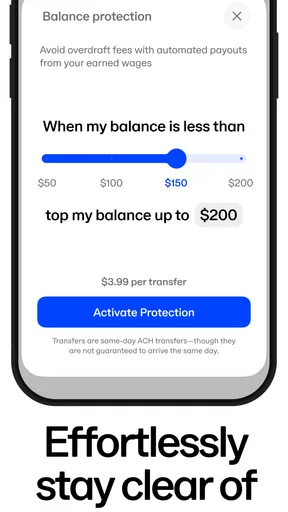
- Can reduce reliance on payday loans or overdrafts
- Useful for managing cash flow between paydays
- Supports workers who need flexible access to income
Limitations of Rain Instant Pay
- Availability depends on employer and payroll system support
- Transfer fees may apply depending on the withdrawal option
- Not all earned wages may be available immediately
- Account verification can delay access to funds
- Frequent withdrawals could make budgeting more difficult
Similar Picks in This Category
View All
LinkedIn: Community & Network
LinkedIn3.8

Zoom Workplace
zoom.com4.1

Microsoft Teams
Microsoft Corporation4.6

Meta Business Suite
Meta Platforms, Inc.4.6

Webex Meetings
Cisco Systems, Inc.4.5

TeamViewer Remote Control
TeamViewer4.4
Frequently Asked Questions
What is Rain Instant Pay, and how does it work?
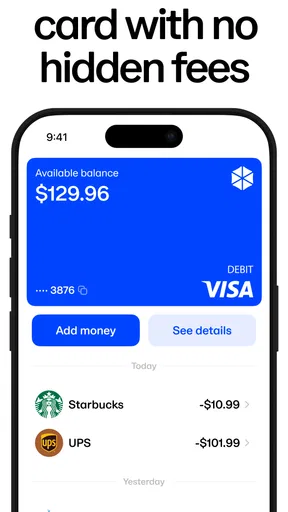
Rain Instant Pay is a financial app designed to help eligible employees access part of their earned wages before their regular payday. After signing in and verifying your identity, the app may connect with your employer’s payroll system to display available earnings. You can then request a transfer to a supported bank account or debit card, depending on the options offered by your employer and location.
Is Rain Instant Pay available to everyone?
No. Access generally depends on whether your employer participates in the Rain Instant Pay service and whether you meet the applicable eligibility requirements. Availability can also vary by country, state, employment status, payroll provider, and account verification results. Before downloading, check with your employer or review the app’s official information to confirm that your workplace and payment method are supported.
How quickly can I receive money through Rain Instant Pay?
Transfer speed depends on the delivery option you select, your bank or card issuer, weekends and holidays, and whether additional verification is required. Some transfers may arrive quickly, while standard delivery can take longer. The app should show the estimated arrival time and any applicable cost before you confirm a withdrawal, so review the details carefully.
Does Rain Instant Pay charge fees for accessing earned wages?
Potential fees may depend on the transfer method, account type, employer arrangement, and the features available in your region. Some delivery options may be free, while faster transfers or optional services could involve a charge. Before confirming a transaction, carefully check the fee summary displayed in the app. Also remember that your bank or card provider may apply separate fees.
Is Rain Instant Pay safe to use, and what information does it require?
Rain Instant Pay may request personal, employment, banking, and identity information to verify your account and process wage transfers. Use only the official app and download it from a trusted store. Protect your login details, enable available security features, and avoid sharing verification codes. Although security measures may be in place, users should review the privacy policy and understand how their data is collected and used.
